
It seems like it would be useful to have this recipie written in one place. After the gate valves are opened and closed, we often have a hard time relocking because of alignment.
Here's what we think we should do to recover after gate valves open.
- Do initial alignment without using green cameras in the loop, as the cameras are right next to the gate valves.
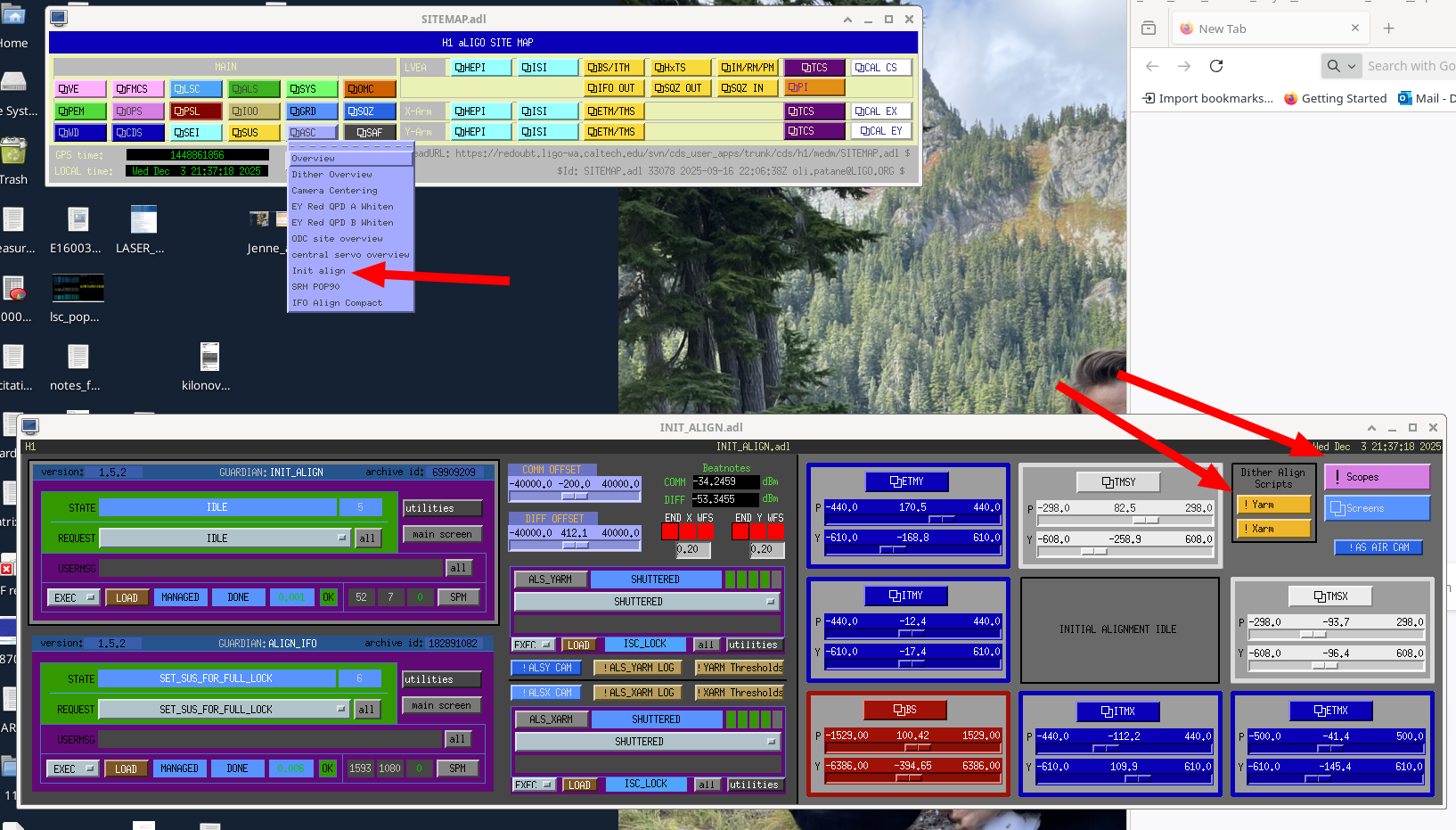
- Start by using the baffle PD dither alignment script to set the TMS alignment: use the suspension guardians to misalign both ITMs and ETMs, run dither align script for both TMSs found on the INIT ALIGN MEDM, (dither align scripts, TMSX and TMSY, can run at the same time). Open the ITM baffle PD scope and watch the script find the pointing of TMS that sets the beam to PD1, PD4, and finally centered on the optic. When this finishes sucsesfully for both TMSs, there should be a dim green beam visible on both ALS cameras, if there is not check the alignment of PR3 (affects both arms) and the BS (only moves the Y arm beam). This TMS alignment has to be set before you can move onto the next step, otherwise the ITM alignment won't be right.
- Use the suspension guardians to align both ITMs, but leave the ETMs misaligned. Run the dither alignment script for ITMX and ITMY, this time watching the ETM baffle PD scope to watch the script's progress. Once this is finished, the ITMs should be set, and we should not move them based on the cameras.
- Use the suspension guardians to set the ETMs to aligned, and you will hopefully see mulitple beams or cavity flashes on the ALS cameras. You can manually align the ETMs to increase the flashes until they are good enough to lock the arm. Use the ALS guardians (in auto mode might be helpful) to set them to ETM_TMS_WFS_OFFLOADED, this will not run the green camera servos, it runs green WFS to the ETM and TMS alignment only to increase build up. Don't run INITIAL_ALIGNMENT or INITIAL_ALIGNMENT offloaded.
- Align the vertex to these ITMs: set the ALIGN_IFO guardian to manual, init it to control the suspension guardians. Choose INPUT_ALIGN_OFFLOADED, once that finishes PRC_ALIGN_OFFLOADED, then MICH_BRIGHT_OFFLOADED, then SRC_ALIGN_OFFLOADED.
- Make two guardian changes before you start locking the full IFO
- Don't use the SRC1 + SRC2 ASC loops in DRMI, these don't seem to work until the alignment is set well for full lock. You can turn these off by going to lscparams, and searching for use_DRMI_ASC, setting SRC1+ SRC2 to false. Load ISC_DRMI for this change to take effect.
- Don't shutter the ALS beams once they are no longer used for locking. In ISC_LOCK, find the edge ('IDLE_ALS', 'CARM_OFFSET_REDUCTION', 5), and reduce the weight which is normally 5 to 1, so that this path which avoids shuttering the ALS becomes the default path. Load ISC_LOCK for this change to take effect.
- Start to relock as usual, going through PRMI. Stop at CHECK_DRMI_ASC, where all the DRMI ASC loops will be running other than SRC1+SRC2, and manually adjust SRM sliders to reduce POP90 and increase POP18.
- You can try to lock all the way to ENGAGE_ASC for full IFO, but this may not work. If it does not, you may need to manually align DHARD, CHARD, and SRM.
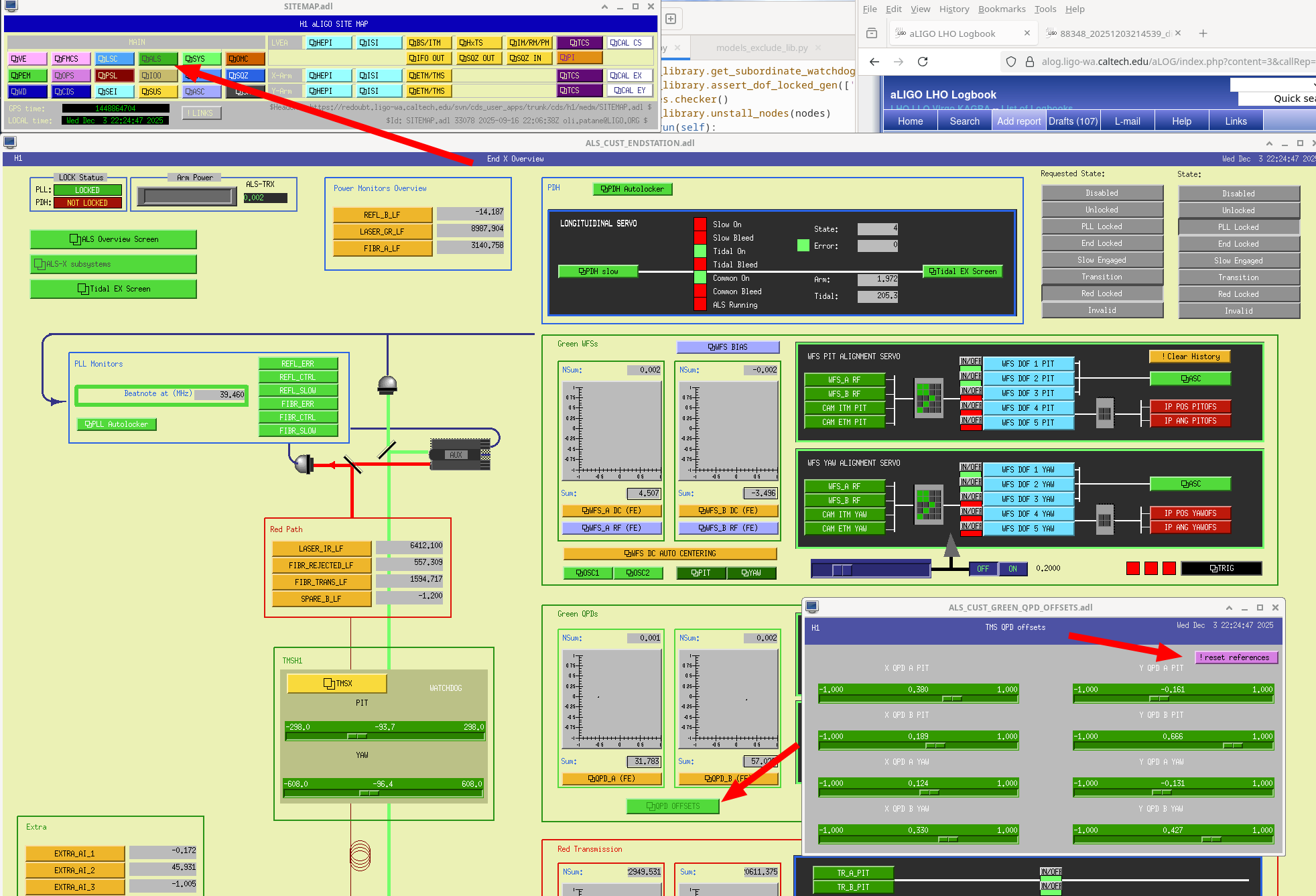
- If you are adjsuting alignments by hand, you want to keep the green beams locked to the arms as the alignment changes. To get the green alignment to follow any changes you make, stop at IDLE_ALS and turn on the scripts that servo the green TMS QPD offsets based on the green WFS. You can access this script by going to either ALS end station overview and clicking the button that says QPD OFFSETs, then using the pink drop down button to start the servo for each arm, and open the ndscope that lets you watch the progress of these servos (screenshot)
- If the power in the two arms is mismatched (visible on the PRMI SB4 min ndscope on the front wall), this could be a sign that DHARD is misaligned.
- If you notice this in a state before DHARD WFS are closed, RF_DARM or CARM_OFFSET reduction , you can use the move_arm_dev script to step DHARD pitch and yaw to bring the arms closer to each other. userapps/asc/h1/scripts/move_arm_dev.py DH P 0.01, or similar.
- If you notice the arm powers diverging from each other after DHARD WFS are closed, this might be fixed by moving SRM while watching to make sure POP 90 stays low.
- If the power recycling gain is low, you may need to adjust CHARD. You can step through CARM_OFFSET reduction or stop after it finishes and use 62110 to check if the refl power is too low for the arm transmission that you are at, and try to move CHARD while trying to increase the refl power (watch build_up_slow ndscope linked from the ISC guardians overview and other places).
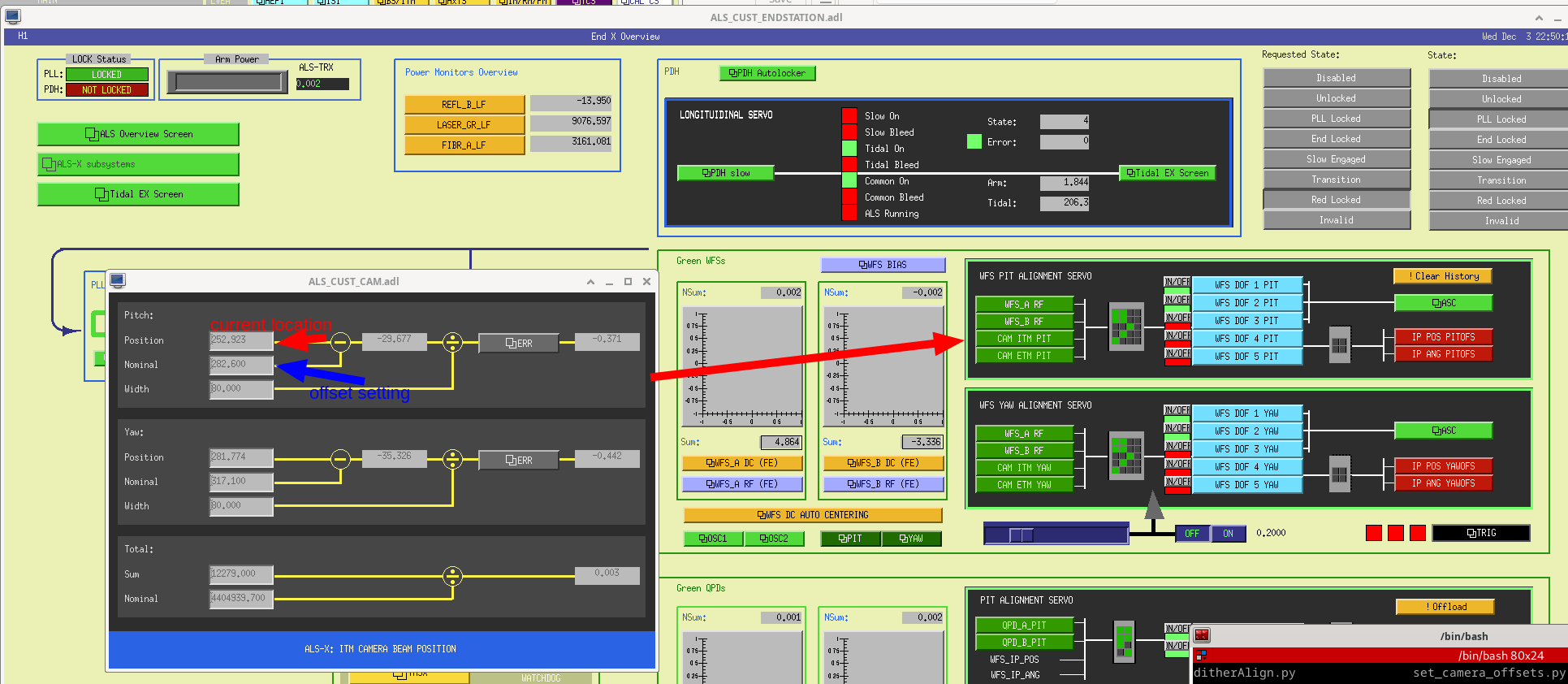
- Once you are all the way locked (congratulations), stop at PREP_ASC_FOR_FULL_IFO before you try turning on ASC. It may be a good idea to note the green QPD offsets with a screenshot, if you loose lock they wil be reverted with SDF revert but you would need to reset them to these values to relock. Also look at the ITM green camera offsets, from each ALS end station overview in the green WFS section there is a button that says CAM ITM YAW or PIT, you can take a screenshot of this screen for both ITM cameras and compare the current location of the beam centroid to the setting (screenshot)
- Use a guardian shell (guardian -i ISC_LOCK) to copy and paste lines from ENGAGE_ASC_FOR_FULL_IFO manually, skipping SRC1 +SRC2. (you might grab another screenshot of the green QPDs and cameras at this point)
- Then you can manual the guardian to TMS_SERVO, engage_soft_loops, and DARM offset, and take another green QPD offset + camera screenshot.
- Having the DARM offset on as well as the soft loops seems to help the SRC ASC work, so try engaging those once those steps are done. (Congratulations on getting all the ASC controlled)
- Important step: reset the green references. In the past we have reset the green QPD offsets by accepting them in SDF as well as the camera offsets, but it doesn't make sense to be changing the QPD offsets as they shouldn't be impacted by the gate valve moving the camera. Today once we had all the ASC engaged, we stepped the QPD offsets back to their original settings from SDF, watching the arm transmissions in the ndscope. The arm transmissions seemed fine with the original QPD offsets, so we left those there and only updated the green camera offsets. I think this should be the way we do things in the future, not reseting the QPD offsets by default.
- undo the gaurdian changes from step 2 above. After the next lockloss, run initial alignment as usual, letting the green cameras be used to point the ITMs. DRMI ASC should work now that the alignment has been set.
Thank you Sheila for writing up this process in very helpful detail.
I wanted to add a few more notes based on many iterations of this process.
#2 and 3 add on: often, if the vent was invasive enough, the other DRMI loops besides SRC ASC may also give some trouble. There are options in the use_DRMI_ASC and use_PRMI_ASC to also disengage PRC1 (PRMI and DRMI), INP1 (DRMI), PRC2 (DRMI) and MICH (PRMI and DRMI). I recommend disengaging PRC1, INP1 and PRC2 if the DRMI ASC is not working well and PRC1 for the PRMI ASC. This will then require moving PRM (PRC1), PR2 (PRC2) and INP1 (IM4) by hand. We rarely disengage MICH. Generally MICH needs to stay on during CARM offset reduction so the beamsplitter can follow DHARD. Also note that SRC2 controls both SRM and SR2, so SR2 may need to be moved as well as SRM.
#4 add on: the DHARD error signal may be very bad if the arms are too far away from resonance, and the error signals can flip sign as the CARM offset is reduced. To make DHARD engagement easier, it might be helpful to step the CARM offset by hand while moving DHARD manually, even taking smaller steps than the guardian code does. Then, DHARD can be engaged. Note: if you find yourself flipping the sign of the DHARD loops to engage them, this is a problem, and you will likely have a lockloss during CARM offset reduction if the DHARD loops are closed with the wrong sign!
#6 and 7 add on: if the alignment is poor enough, it might be necessary to walk the IFO alignment further before engaging the loops in ENGAGE_ASC_FOR_FULL_IFO by putting the guardian code in the terminal. This is the process I follow:
- group the loops into CHARD/INP1/PRC2 pitch and yaw
- turn off the soft limiters so you can see the full error signal
- I find the full IFO ASC ndscope template useful here: sitemap>LSC>locking>locking scopes>ASC signals
- sitemap>ASC>overview>ASC arm cavities/central part> upper left corner of each loop control block called "[loop]_SMOOTH_ENABLE"
- step CHARD using the move_arms_dev.py script, PRC2 with PR2 slider and INP1 with IM4 slider. Start with either pitch or yaw only. These loops are sometimes cross coupled, so you might need to step one and then the other iteratively. Check that as the error signals go to zero the buildups improve (PRG, POP18 and arm power increase, POP90 decrease)
- Once the error signals are close to or at zero, use the guardian code to engage their filters and gains to close the loop. Repeat this process for pitch and yaw.
- Before closing ADS3, move PRM to bring the ADS error signal close to zero
- Then, proceed to move SRM and SR2 to close SRC1 and SRC2. If this doesn't work, leave them open until the soft loops are closed, then try again
- You might need to go line by line with the guardian shell for ENGAGE_SOFT_LOOPS. ADS4 and ADS5 control the X arm SOFT and Y arm SOFT dofs respectively. You can also use move_arms_dev.py to steps these dofs closer to zero before closing the loop
I like the recommendation of noting the green camera references throughout the process. If you lose lock before you get a chance to reset the references, you will have to repeat the whole process (alignment does not offload after DRMI!). Jenne's metaphor is that the green references are like video game save points, so noting them throughout the process can be helpful in case a lockloss happens, you can return to where you were before. The final green reference setting should be after all alignment loops are closed (including soft loops!).
Another offset that is useful to reset is the POP A offset. In DRMI, PRC1 runs on the POP A QPD and the alignment is offloaded. If the POP A offsets are set to the PRM's final location in ENGAGE_ASC_FOR_FULL_IFO, the ADS convergence for DOF3 will be much faster, as DRMI will put the PRM where it already needs to be. The convergence of this loops is so slow it sets how long this state takes, which can be many minutes if the PRM is far off from where it needs to be.
Created a wiki page for Recovering the IFO After Gate Valve Closures and added a link to that wiki in our ops Troubleshooting the IFO wiki. This way we can make changes next time we exercise this procedure and hopefully it leaves more bread crumbs to find it again.